TeleChat Bot - for Data Teleport Tool
User Stats
Overview
TeleChatBot is a handy tool that helps you send messages and files through Telegram. It uses the Telegram
API, making it easy to share things directly with yourself.
Imagine you're in a bustling office or a classroom and need to retrieve crucial information, but your phone
is nowhere to be found. TeleChatBot is your perfect solution, allowing you to send messages or files to
yourself without any hassle.
Currently, our service supports one-way messaging, making it ideal for quick and efficient access to
information. Simply sign up for TeleChatBot on Telegram, and once you receive your unique key, there's no
need to share personal information like your email or connect to other services. It’s that simple!
🚀 How It Works
Imagine you’re at work or school and need to grab some important data fast, but you don’t have your phone.
That’s where TeleChatBot comes in. You can send messages or files to yourself without any fuss.
Right now, TeleChatBot only allows one-way messaging. This means you can send stuff to yourself but not to
others. It’s perfect for quick access to information when you need it.
📲 How to Use TeleChatBot
Using TeleChatBot is super simple. Here’s what you need to do:
-
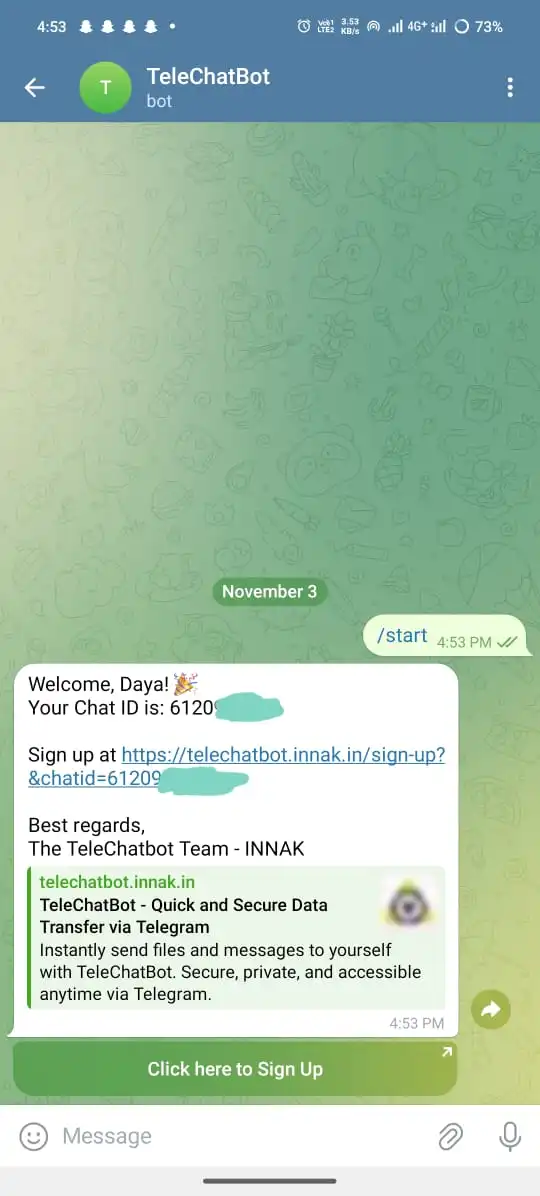
Start the Bot:
Send "/start" to the TeleChatBot service by messaging @Send_data_to_yourselfbot to receive your sign-up link.
-
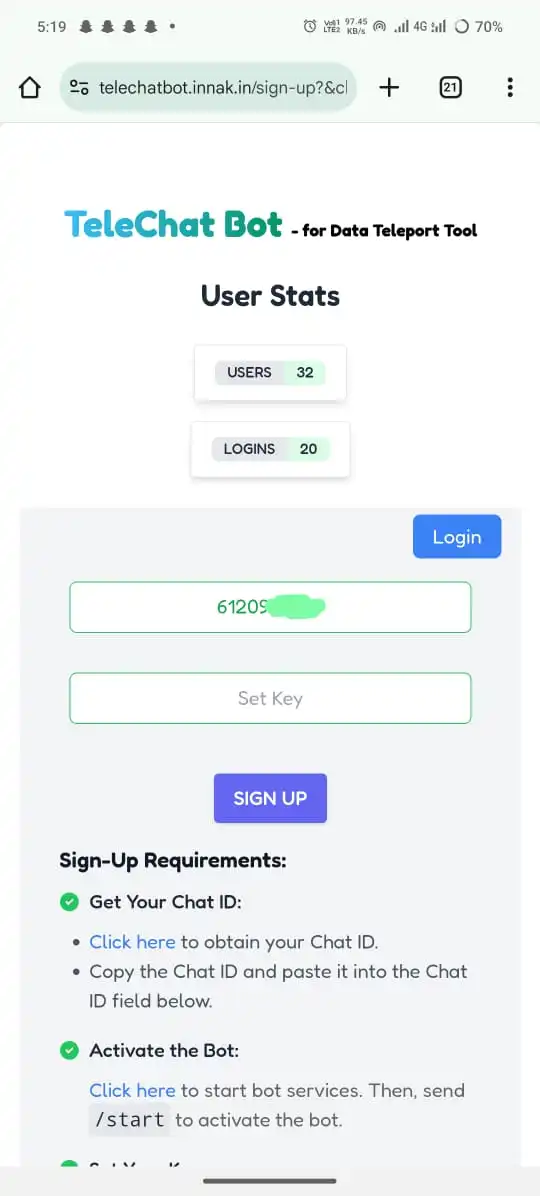
Sign Up:
Set your secure key for easy remembering. Please use at least 4 characters when creating your key during sign-up.
-
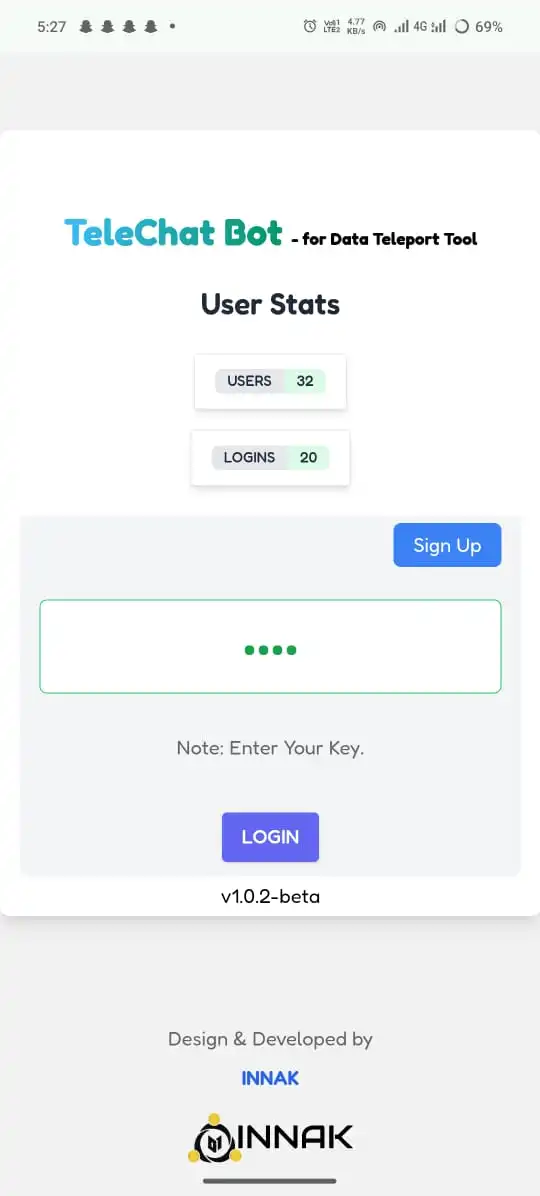
Login:
Use your secure key to log in to TeleChatBot.
- Accept Terms and Conditions: Before sharing any data, ensure you accept TeleChatBot's terms and conditions.
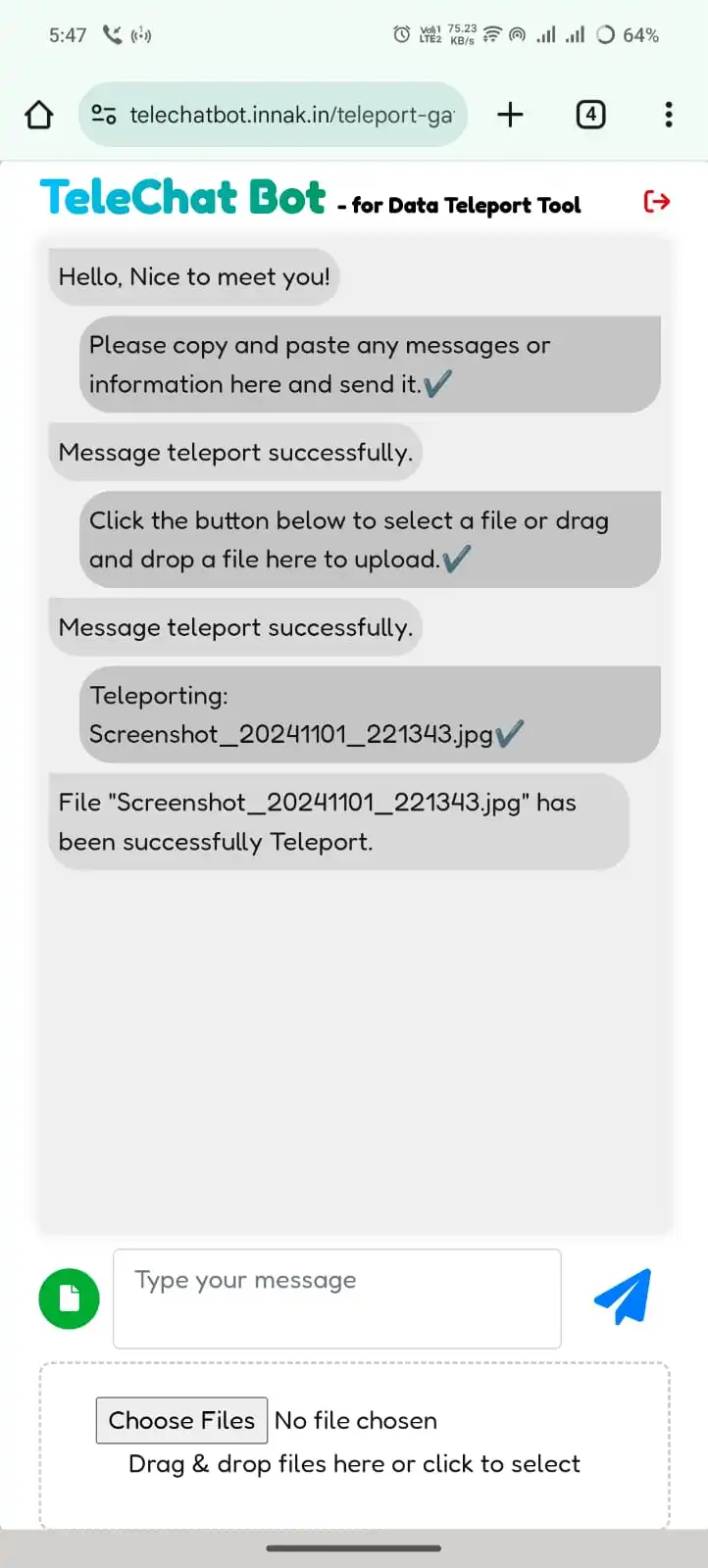
- Teleport Info: Click the "Send" button to Teleport directly via Telegram.
-
Result:

Share Without Hassle
Once you’re set up, sharing is easy. You don’t need to provide personal info like your email. Just use your chat ID and unique key to send files to yourself.
Why Use TeleChatBot?
- Quick Access: Get important data fast, even when you don’t have your phone.
- No Extra Apps: You don’t need to link WhatsApp or other apps to share files.
- Privacy: Your personal info stays safe. We only keep your chat ID and unique key.
🌐 Universal Accessibility
You can use TeleChatBot on any device. Whether you’re on a phone, tablet, or computer, it works smoothly.
🔒 Security and Privacy
At TeleChatBot, we care about your security. All messages and files are sent using Telegram’s secure system. This way, no one else can see your information.
⚖️ Legal Disclaimer
TeleChatBot helps you share files easily and securely. However, it’s important to use the service in the
right way. You are responsible for making sure that the files you share follow the law.
Sharing illegal content is not allowed. We do not support any illegal activities.
🤔 Frequently Asked Questions (FAQs)
A1: You can share various file types, including images, documents, and videos.
A2: We only store your Chat ID and key; all data is sent directly through the Telegram API without accessing your personal information.
A3: Yes, you can share files up to 50 MB.
A4: Simply visit our website, register for an account, and connect your Telegram account to start sharing files.
A5: No, you can share as many files as you like, as long as each file is within the size limit of 50 MB.
A6: Yes, a Telegram account is required to use TeleChatBot for file sharing.
A7: No, you can only share files with yourself; you need the other user's key to log in and send files.
A8: You can re-register to change your key if you forget it.
Conclusion
TeleChatBot is the best way to share files easily and securely on Telegram. Whether you’re at work, school, or out and about, you can quickly send messages and files to yourself. Enjoy quick access to your important data anytime, anywhere!
v1.0.2-beta